
How Windows 11 Home Delivers a Seamless Experience for Everyday Users
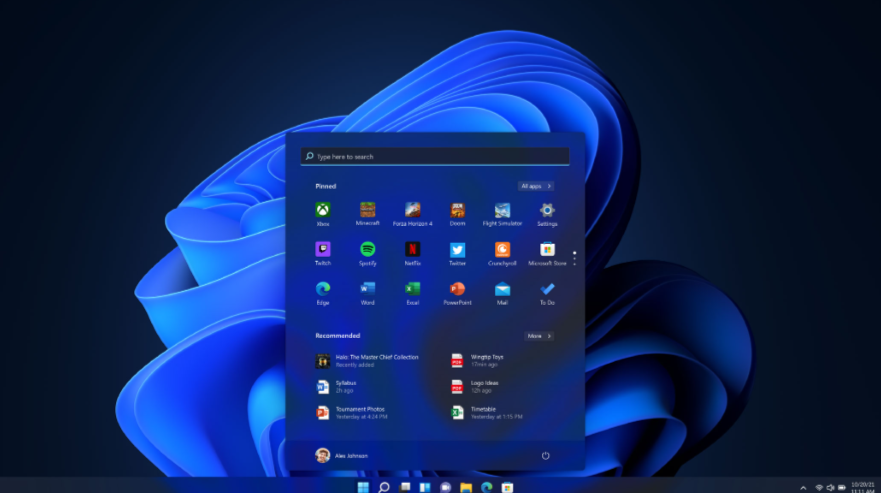
Windows 11 Home has redefined the personal computing experience, offering a smooth, intuitive, and innovative interface for everyday users. Whether it’s for productivity, entertainment, or communication, the operating system introduces features designed to make daily tasks effortless and enjoyable. With its modern look and array of practical functionalities, windows 11 home caters to the demands of users seeking a seamless digital experience.
A Clean and Intuitive Interface
One of the standout features of Windows 11 Home is its user-friendly design. The refreshed Start Menu, centered on the taskbar, provides quick and easy access to essential apps and functions. The more streamlined layout makes navigating between tasks fluid and more visually appealing. Live Tiles have given way to a simpler, less cluttered aesthetic, creating a distraction-free environment that enhances focus.
Snap Layouts, another notable addition, allow users to organize their windows in a way that suits their workflow. With the ability to group apps and seamlessly switch between them, multitasking is more efficient than ever. Whether you’re working on a project, attending a virtual meeting, or managing personal tasks, the interface simplifies and enhances the experience.
Performance That Keeps Up With Everyday Demands
Windows 11 Home is built to be fast and responsive. Improved resource allocation ensures your device runs smoothly, even when multiple tasks are running simultaneously. Faster boot times and enhanced performance mean you can start your day without unnecessary delays.
Power efficiency improvements also extend battery life on compatible devices, allowing users to stay productive longer, whether at home or on the go. This focus on optimization ensures that everyday computing feels effortless, catering to both casual users and those who rely on their devices for handling daily responsibilities.
Enhanced Connectivity and Communication
The importance of staying connected cannot be overstated, and Windows 11 Home ensures you can do so with ease. The pre-installed communication app allows for instant collaboration and effortless chatting and video calls. Whether connecting with family, friends, or colleagues, the process is seamless, reinforcing relationships and creating stronger bonds.
For internet activities, the operating system includes enhanced tools for smoother browsing, secure downloads, and easier access to cloud services. This is particularly useful for individuals who need on-demand access to online resources and files from any device.
A Safer Computing Environment
Built-in security features are integral to Windows 11 Home, ensuring users have peace of mind while navigating the digital space. Tools designed to defend against the latest threats are pre-installed and work in the background without requiring additional setup.
From secure booting processes to encryption technology and reliable parental controls, the system protects users and their families while maintaining their privacy. This provides an added layer of confidence for those who rely on their devices for online banking, shopping, and managing personal information.
Effortless Integration for Entertainment
Entertainment is a crucial part of the Windows 11 Home experience. It supports advanced graphics and sound technologies that enhance gaming and media streaming activities. Users can access their favorite movies, shows, or music with minimal effort, and the system adapts to various preferences to deliver an optimized viewing experience.
Additionally, seamless compatibility with several third-party entertainment apps ensures that users have the freedom to customize their setup. This adaptability makes the operating system an excellent choice for those looking to balance productivity and leisure.